
Best LCD drawing tablet for kids review
An LCD drawing tablet that lets kids draw, write, and doodle without wasting paper – eco-friendly and endlessly reusable.
Score
Summary
This LCD drawing tablet is perfect for kids who love to draw. No paper needed, endlessly reusable, and the battery lasts for months.
Best For:
- ✓ Children who draw a lot
- ✓ Eco-conscious families
- ✓ Travel and on-the-go
- ✓ Writing practice
Not Ideal If:
- ✗ You want to save drawings
- ✗ You want full-color drawings
- ✗ You're looking for a digital device with apps
Product Overview
What it is:
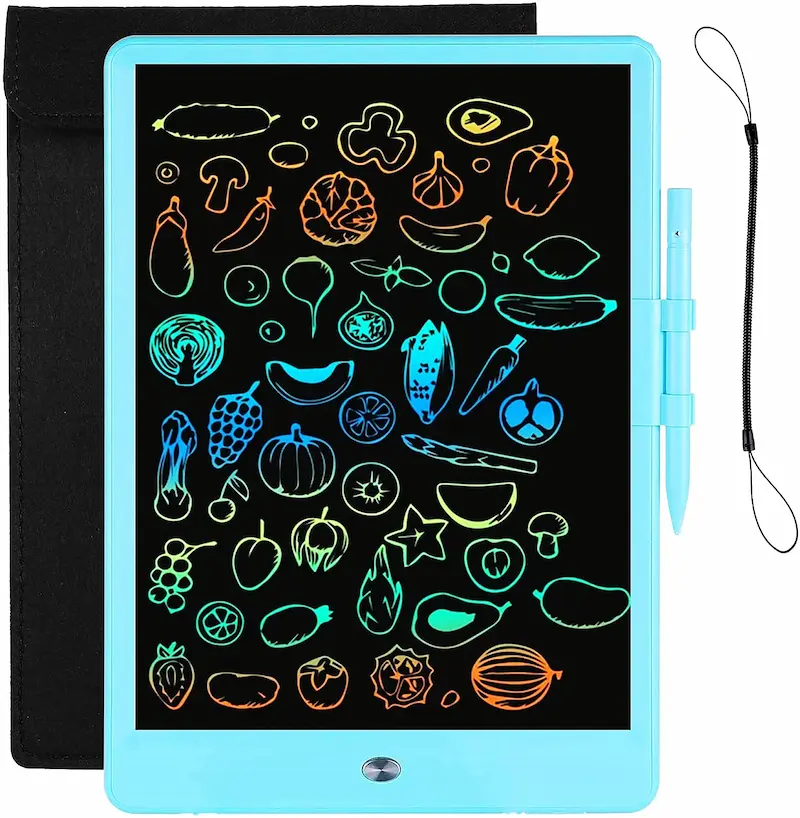
An LCD drawing tablet is an electronic drawing board where children can draw and write with a stylus. With one press of a button, everything is erased and you can start again.
Why it was created:
This type of tablet solves multiple problems:
- No more paper needed
- No spilled paint or markers
- Compact and portable
- Endless reuse
Key takeaway: A smart, eco-friendly way to stimulate creativity without mess.
What's in the Box
- LCD drawing tablet
- Stylus (often attached)
- Battery (usually included)
- User manual
Note: The battery lasts very long (often 6-12 months normal use) because only erasing uses power.
Key Features
Pressure-Sensitive Screen
Line thickness varies with the pressure you apply. This gives a natural drawing feel similar to real paper.
One-Button Erase
One press of the button clears the entire screen. Perfect for quick sketches and starting over endlessly.
No Blue Light
Unlike tablets and phones, an LCD drawing tablet emits no harmful blue light. Safe for children's eyes.
Ultra Light and Portable
Weighs almost nothing and fits in any bag. Ideal for car rides, restaurants, or waiting rooms.
Full Description
The LCD drawing tablet for kids is a modern solution for endless drawing. The screen works without backlighting and shows the drawing in a contrasting color against a dark background.
The pressure-sensitive stylus creates lines of different thicknesses. Light pressure gives thin lines, harder pressure gives thicker lines. This gives children control over their drawings.
The biggest advantage is reusability. Children can make hundreds of drawings without ever using paper. This not only saves money but is also good for the environment.
For travel, this tablet is ideal. It's light, thin, and keeps children busy without having to bring bags full of colored pencils. Perfect for airplanes, cars, and restaurants.
One limitation is that drawings cannot be saved. If your child wants to keep a drawing, you need to take a photo before erasing. For some children, this can be frustrating.
Build Quality & Safety
Durability:
Sturdy plastic housing that can take a bump. The screen is fragile but well protected by the edge.
Safety features:
- No blue light
- No sharp edges
- Safe battery housing
- Non-toxic materials
Practical tip: Although the screen is sturdy, throwing hard or standing on it can damage it. Teach children to handle the tablet carefully.
Learning & Development Value
Fine Motor Skills
- Holding and controlling stylus
- Drawing controlled lines
Creativity
- Free drawing and experimenting
- Creating own designs
Writing Skills
- Practicing letters and numbers
- Improving handwriting
Math
- Drawing shapes
- Developing spatial awareness
Pros & Cons
+ Pros
- ✓ Endlessly reusable
- ✓ Eco-friendly
- ✓ No mess
- ✓ Long battery life
- ✓ Light and portable
- ✓ No blue light
− Cons
- ✗ Cannot save drawings
- ✗ Only one color
- ✗ No undo function
- ✗ Cannot partially erase
Who Should Buy It
Buy it if:
- Your child draws a lot
- You want to save paper
- You need something for travel
- You don't want mess
Skip it if:
- You want to save drawings
- Colors are important to you
- You expect a "real" tablet
Frequently Asked Questions
Final Verdict
The LCD drawing tablet is a brilliant invention for creative children. Endless drawing without paper, mess, or harmful screen radiation. Perfect for home and travel.
